
Lisätiedot -välilehti (Additional Information tab)
Histori välilehti (History tab)
Liitteet - välilehti (Attachments tab)
Listat - välilehti - (Lists tab)
Kutsu - välilehti (Invitation tab)
What is a Company Card?
The Company Card is a detailed company-specific view that provides the customer with access to comprehensive status information, reports, contact details, and notes related to the company.
Tila - välilehti (Status tab)
On the Tila (Status) tab, you can view the company and its status information.
-
Tila (Status) tab displays all status interpretations.
-
If you want you can also open the latest Tilaajavastuuraportin (Reliable Partner Contractor’s liability information) Tarkasta kaikki tiedot -painikkeesta

Picture: Status interpretations on the Status tab
Under Palvelut ja yritystiedot (Services and Company Information), you can see the company's:
- Luotettava Kumppani (Reliable Partner) service level
-
Luotettava Kumppani Kestävyysraportin ( Reliable Partner Sustainability Report) status
-
Luotettava Kumppani Legal Compliance (Reliable Partner Legal Compliance Report) status
-
Luotettava Kumppani Luottamusmerkin (Reliable Partner Trust Badge)
If the company has not subscribed to any of these services (puutuu = missing), you can invite the company to join the service by clicking Lähetä Kutsu (Send Invitation) button.


Note! Company information is only visible with the Valvoja Standard service level. With the Valvoja Lite service level, only the Palvelut (Services section) and the company's Reliable Partner service level are visible.

Picture: Valvoja Lite Services view
Under Rooli ja valvonta (Role and Monitoring), you can see:
- The company's role/position in the contract chain
- When the company was added to monitoring
You can also stop monitoring the company by clicking Lopeta valvonta (Stop Monitoring button).
- Even if monitoring is stopped, the company's Contractor’s liability information reports, as well as any notes and contact details, will be retained.

Picture: Role and Monitoring
Lisätiedot -välilehti (Additional Information tab)
On the Lisätiedot (Additional Information) tab, you can add and edit the following company-related information:
- Notes
- Contact person details (name, email address, and phone number)

Picture: Additional Information tab
Historia -välilehti (History tab)
On the Historia (History) tab, you can find the company's archived Subscriber Liability Information reports.
You can also view:
- All archived reports
- The number of archived reports
- Who added the company to monitoring
- Who removed the company from monitoring
- The status of the Luottamusmerkin (Reliable Partner Trust Badge)(if the company has subscribed to it)

Picture: History tab
Liitteet-välilehti (Attachments tab)
Liitteet (Attachments) tab is visible only to Valvoja Standard users
Adding attachments to companies (PDF):
- Virus scanning
- Archiving
- Attachment alerts in the user interface (email alerts are not currently included)
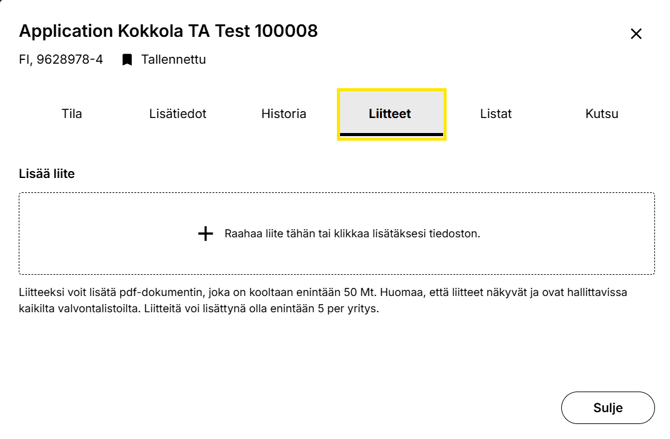
Picture: Attachments tab
You can add a PDF document as an attachment, with a maximum file size of 50 MB. Please note that attachments are visible and manageable from all monitoring lists. A maximum of 5 attachments per company can be added.
Deleting attachments
If necessary, you can delete attachments. Before you can delete an attachment, it must first be archived.
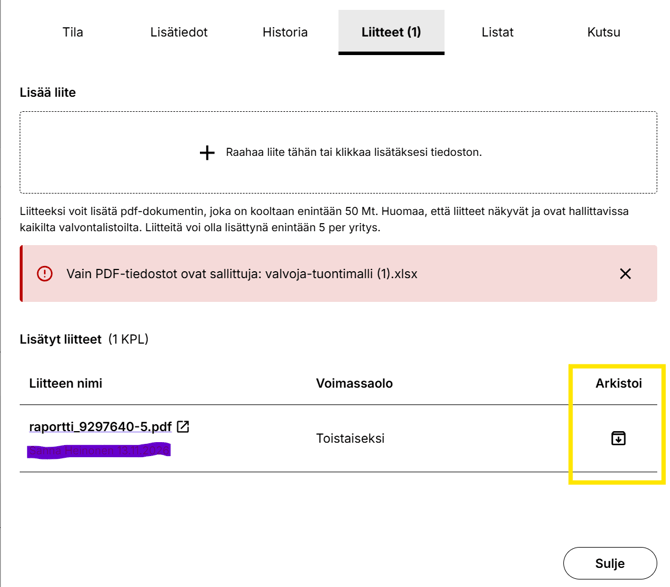
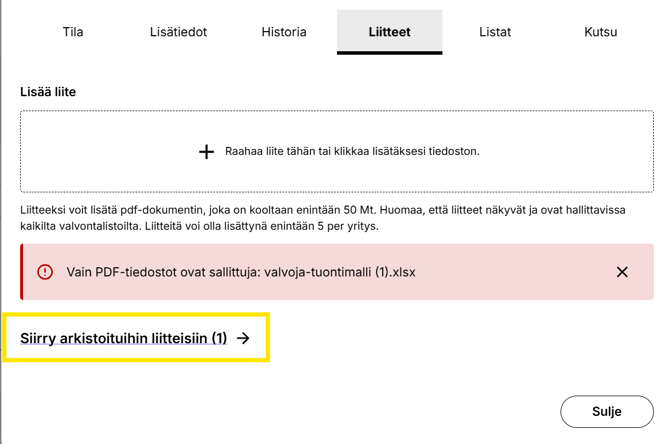
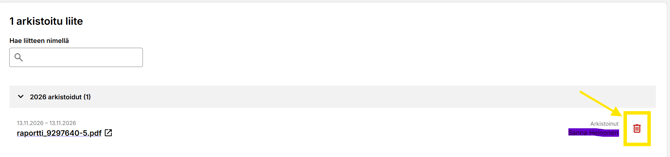
Click Vahvista (Confirm) to delete the attachment.

Listat-välilehti (Lists tab)
Easily check whether your supplier appears on other monitoring lists as well.
-
Makes it easier to find reports and monitoring lists when you have multiple monitoring lists.
-
Check the company's connection to other monitoring lists from a single location.
-
Quickly review the start and end dates of monitoring.
Listat (Lists) tab, you can see information about when the company's:
- monitoring started
- monitoring ended
You can also filter companies on the Listat (Lists) tab to show:
- only companies currently under monitoring
- both active and archived (ended) lists

Picture: Lists tab
Kutsu -välilehti (Invitation tab)
On the Kutsu (Invitation) tab, you can invite a company to join:
-
Luotettava Kumppani (Reliable Partner) service
-
Luotettava Kumppani Kestävyysraportti (Reliable Partner Sustainability Report) service
-
Luotettava Kumppani Legal Compliance (Reliable Partner Legal Compliance Report) service
The recipient's details are automatically populated from the contact person added on the Lisätiedot (Additional Information) tab. If no recipient has been added on the Lisätiedot (Additional Information) tab, you can enter the recipient's email address separately.
Note! Invitations can only be sent for one service at a time.

Picture: Invitation tab