
At the moment, the Valvoja service is available only in Finnish.
- Sign in
- Creating a New Monitoring List
- Responsible persons
- Monitoring Lists menu
- Adding a Company to a Monitoring List
- Adding Multiple Companies
- Company monitoring
- Chain view
- Reviewing Company Information
- Removing a Company from a Monitoring List
- Report Archiving
- Notes fields
- Ending Monitoring
At the moment, the Valvoja service is available only in Finnish.
Sign in
Sign in to your account and select Valvoja Lite from the customer portal home page by clicking Siirry Valvojaan (Go to Valvoja) →.

Valvoja always opens in the main view. Under the Valvonta (Monitoring) tab, you can find created monitoring lists and monitored companies.
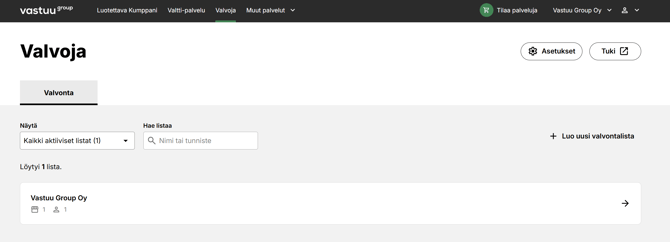
Monitoring in a Nutshell
Monitoring consists of four main steps:- Create a monitoring list
- Add responsible persons
- Add companies
- Monitor company information on the monitoring list
Creating a New Monitoring List
In the Valvonta (Monitoring) tab, select +Luo uusi valvontalista. (+ Create New Monitoring List).
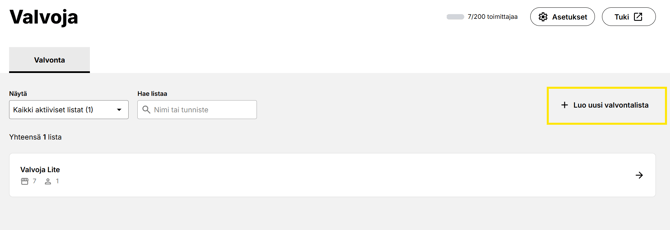
Picture: Create New Monitoring List
Enter the basic information:
- Monitoring list name (required)
- Identifier (for example, project, property, or site ID)
- Street address
- Postal code
- City
- Notes
Select the preferred Vastuuhenkilöt (Responsible Persons) from the list.
-
Only users authorized for the Valvoja service are displayed.
-
When all information has been entered, select Vahvista (Confirm).
Please note: The start date cannot be in the past because automatic monitoring cannot be performed retroactively.
The start date is automatically the date the monitoring list is created.
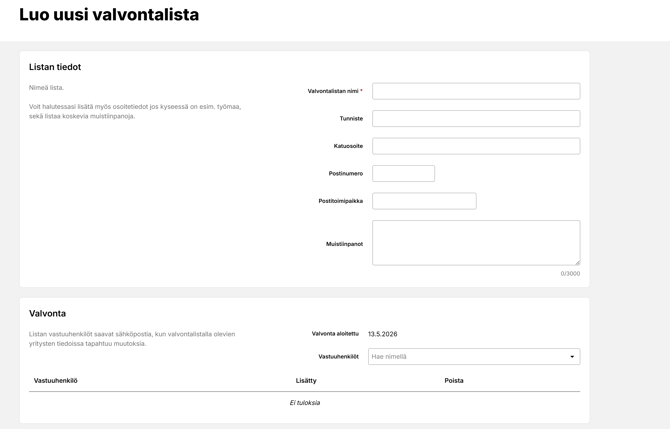
Picture: Monitoring list information
Responsible Persons
Responsible persons receive email alerts about new issues requiring attention for monitored companies. It is recommended to assign more than one responsible person.
Any user authorized for the Valvoja service can be selected. User accounts and permissions are managed in the Käyttäjähallinta (User Management) view.
Both main users and basic users can add and edit monitored items. To add or edit responsible persons:
- Select a monitoring list
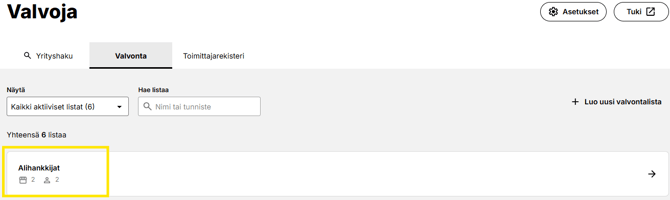
- Muokkaa (Edit ) Add responsible persons → Save changes

- Add responsible persons from Vastuuhenkilöt (Hae nimellä)

- Tallenna muutokset (Save changes)
Monitoring Lists Menu
The number of visible monitoring lists can be filtered using the Näytä (Show) option.
|
Näytä (Show) |
|
|
Omat aktiiviset listat (My Active Lists ) |
Shows active monitoring lists where the user is a responsible person. |
|
Kaikki aktiiviset listat (All Active Lists) |
Shows all active items on the account. |
|
Arkistoidut listat (Archived Lists) |
Shows all completed items on the account |
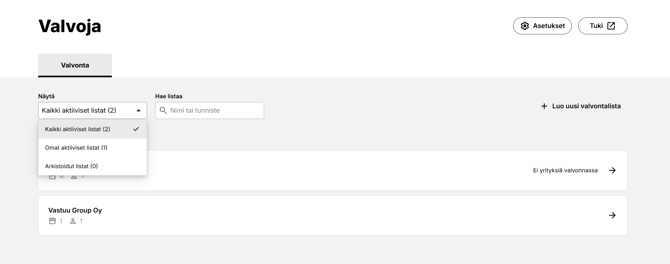
Picture: Monitoring list - filter
Adding a Company to a Monitoring List
To add a company to the monitoring list, first select the preferred monitoring list from the menu. Then add the company to be monitored by clicking the Lisää yritys (Add company) -button.
- Enter the name or identifier in the Hae listaa (Search list ) field.
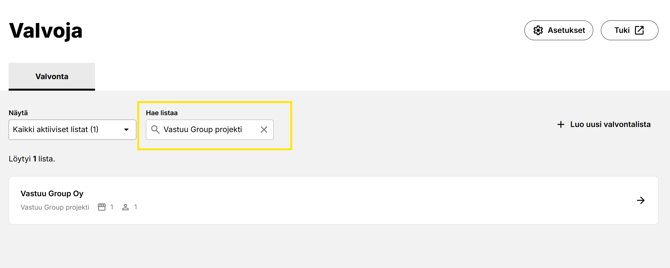
- Click + Lisää yritys valvontaan (+Add Company).
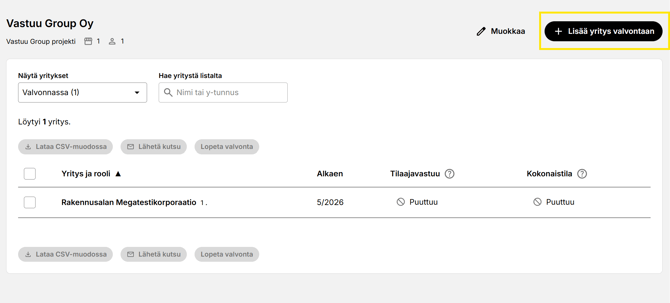
- Add the company to the monitoring list.
You can search for a company using the Hae yritystä (Search company) button by Nimellä tai y-tunnuksella (company name or Business ID).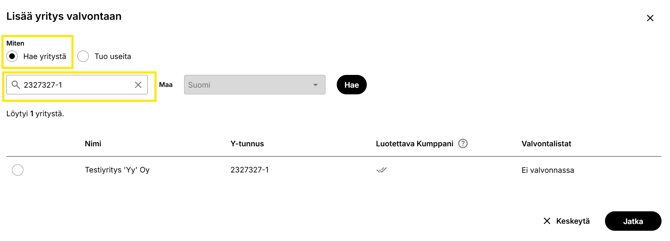
A search by Business ID returns a single company, which can be added to monitoring by clicking the button that appears on the left and selecting
Jatka (Continue).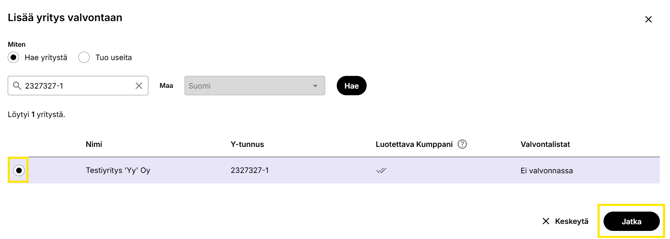
Picture: Adding a single company to the monitoring list
Yrityskortti (Company Card) of the company to be added to monitoring opens.
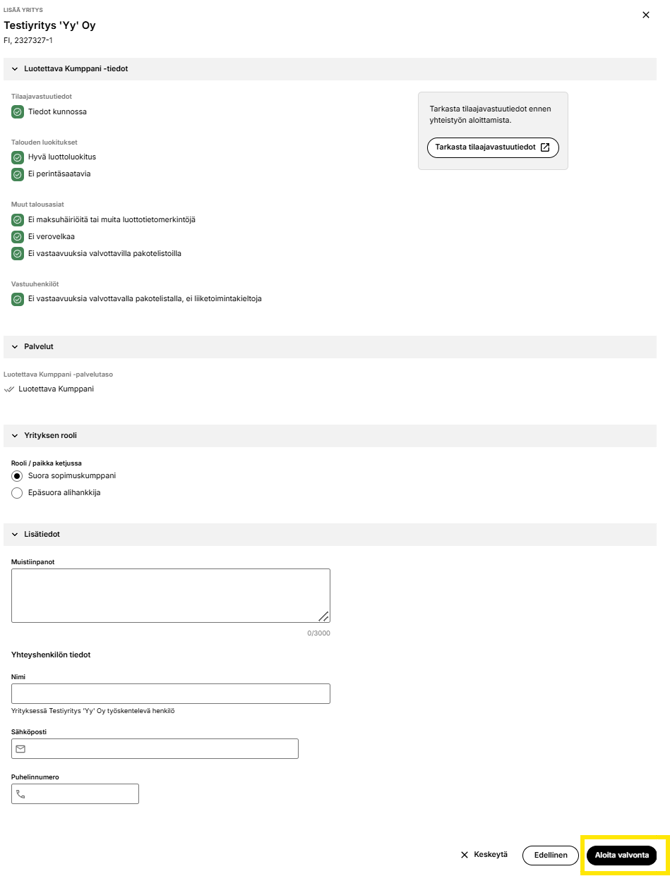
Picture: Company card of the company to be added to monitoring
Define the company’s role:- Suora sopimuskumppani = Direct contractual partner
- Epäsuora alihankkija = Indirect subcontractor
- Nimi (Yrityksessä työskentelevä henkilö)= Name(Employee working for the company)
- Sähköposti = Email
- Puhelinnumero = Phone number
Add the company to the monitoring list by clicking Aloita valvonta (Start Monitoring) button that appears on the right.
Important Notes
- Monitoring cannot begin in the past.
- The earliest possible start date is the current date.
- Monitoring must always be ended manually in the service.
- Monitoring should start no later than contract signing to comply with the Act on the Contractor’s Obligations and Liability.
- The most important requirement is to have a valid report that has been reviewed and archived at the time the contract is concluded.
- For contracts lasting over one year, monitoring must be continuous.
- Contractor obligation information must be reviewed at least once per year.
- The recommendation of the Confederation of Finnish Construction Industries RT (Rakennusteollisuus RT Ry) is every three months.
Adding Multiple Companies
You can speed up importing information for monitored companies by adding multiple companies to monitoring at once using Tuo useita y-tunnuksia (Import multiple Business IDs).
Separate the Business IDs with a space, comma, semicolon or enter each one on a separate line. Once all Business IDs have been entered, select Jatka (Continue).
Please note that Business IDs must be in the format 1234567-8 for the system to accept them.
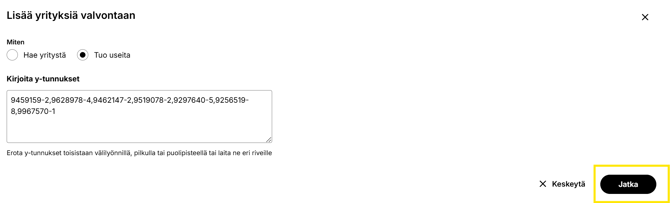
Picture: Searching for multiple companies
Add the companies to the monitoring list by selecting them using the button located in the upper left corner.
Once the companies have been selected, click Aloita valvonta (Start monitoring).
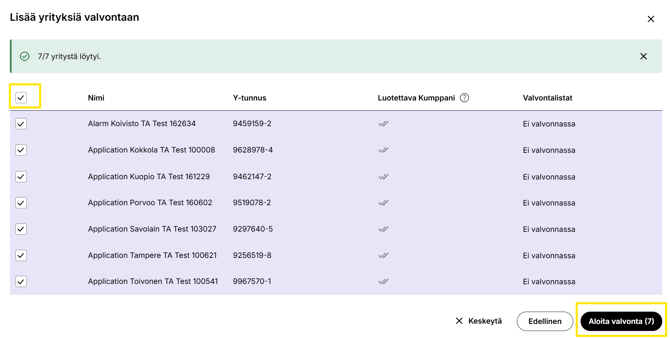
Picture: Adding multiple companies to the monitoring list
Chain View
In the Valvoja Lite service level, the chain view is displayed visually using numbers.- The chain view is shown in the list view as levels 1–4.
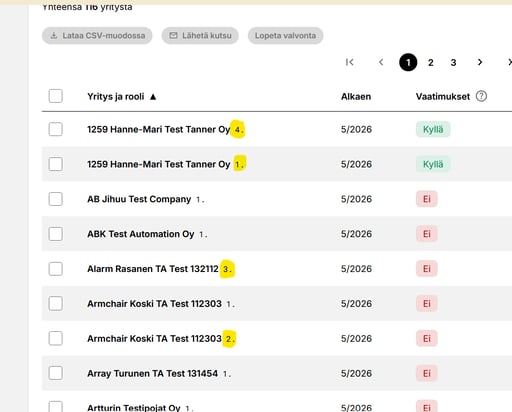
Picture: Chain view in the Monitor Lite service level
Company Monitoring
Contractor Obligation Information
- Reports for monitored companies are archived until the company is removed or the Valvoja service is terminated.
- Each company card contains a button for viewing reports.
- The color and label indicate the status of the latest contractor obligation report.
- Valvoja sends notifications to responsible persons when a company's status changes for the worse.
- Reliable Partner customers are also informed of deficiencies.
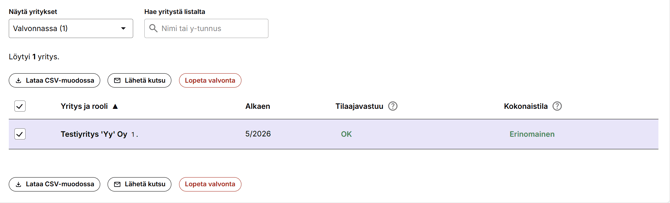
The color and name of the contractor obligations interpretation indicate the status of the company's most recent contractor obligations report.
The question mark icon provides additional information:
- Luotettava Kumppani (Reliable Partner) report status
- Whether the company has left the Luotettava Kumppani (Reliable Partner) - service
- Additional information on report interpretations

Picture: Interpreting the Subscriber Liability Report
When the preferred company is selected from the monitoring list, the company's Yrityskortti (Company Card) opens.
Clicking Tarkasta kaikki tiedot (Review all information) button opens Luotettava Kumppani (Reliable Partner) report.
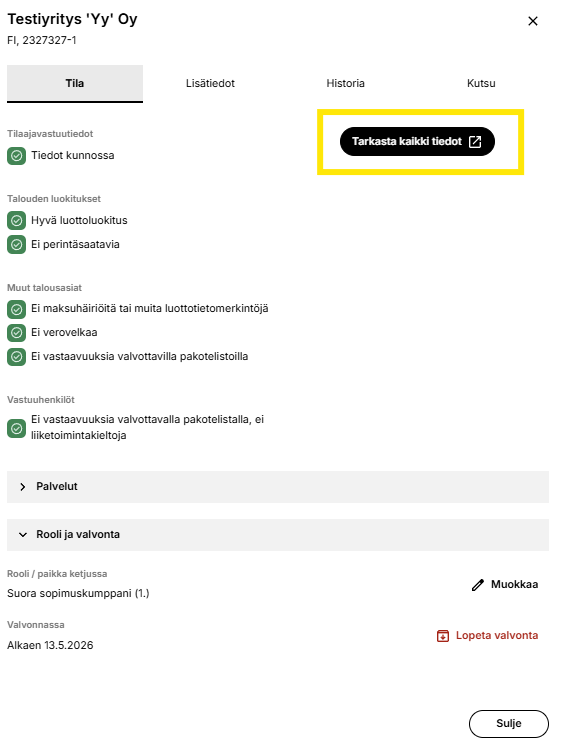
Picture: Company Card
Status button colors and their meanings:
Tilaajavastuu = Contractor's Obligations
OK = OK
Huomio = Notice
Odottaa = Pending
Selvitä = Clarify
Seis = On hold
Puutuu = Missing
Kokonaistila = Overall Status
Huomioitavaa = Points to Note
Selvitettävää = Requires Clarification
Tarkistettavaa = Requires Review
Puutuu = Missing
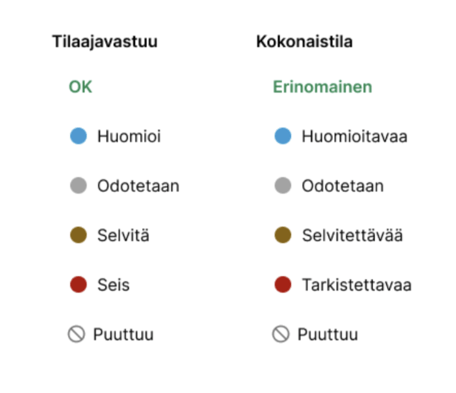
Picture: Contractor's Obligations and Overall Status - Colors and Interpretations
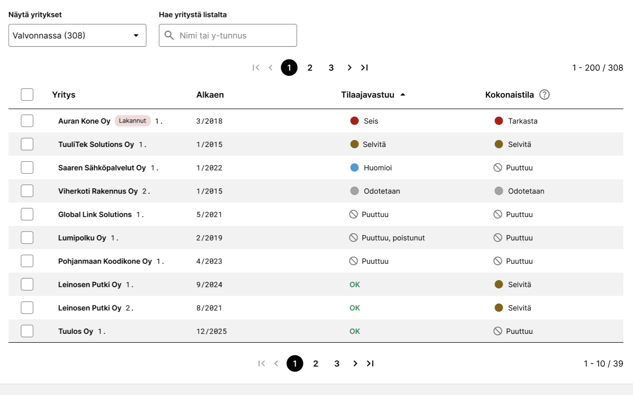
Picture: Interpretations of Contractor's Obligations and Overall Status for monitored companies in the list view
Overall Status Information
To the right of Luotettava Kumppani (Reliable Partner) contractor obligations status, Kokonaistila (overall status) of the company's Luotettava Kumppani (Reliable Partner) report is displayed if the company has subscribed to the service.

Picture: Luotettava Kumppani (Reliable Partner) Overall Status
Read more about overall statuses here.
Reviewing Company Information
You can view the company and its status information as follows:
- Click the company name.
- Yrityskortti (Company Card) opens.
- Select the Tila (Status) tab to see all status interpretations.
- Optionally open the latest report via Tarkasta kaikki tiedot (Review All Information).
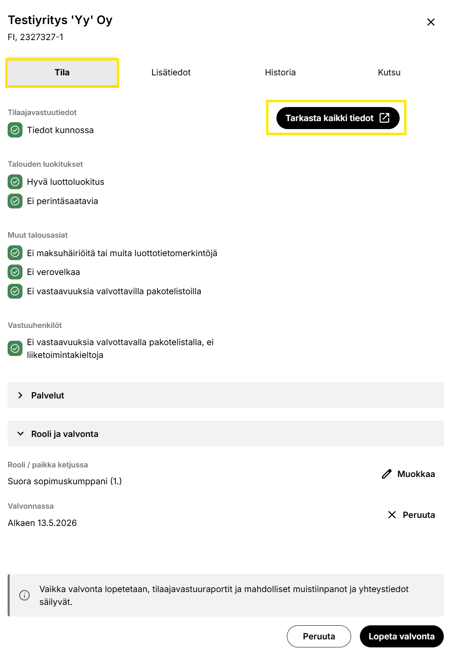
Picture: Reviewing Company Information, Company Card
Removing a Company from a Monitoring List
You can remove a company from the Monitorinf as follows:
- Click the company name from any list view.
- Yrityskortti (Company Card) will open.
- Scroll to the bottom of the card and click Lopeta Valvonta (Stop Monitoring).
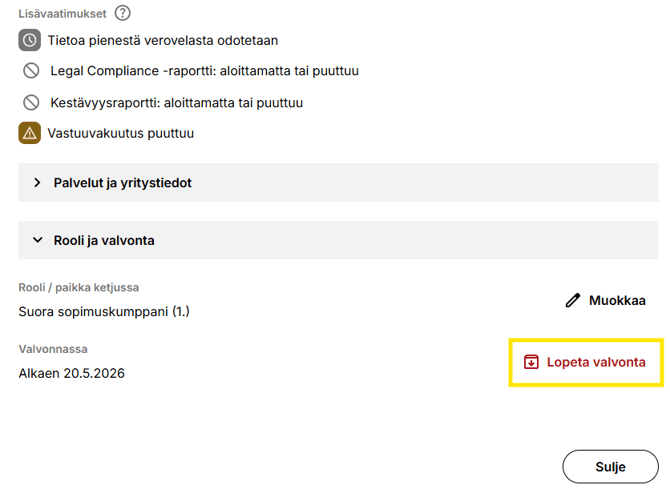
- Confirm that you want to stop monitoring by clicking Lopeta Valvonta (Stop Monitoring).
- If you do not want to stop monitoring, click Peruuta (Cancel).
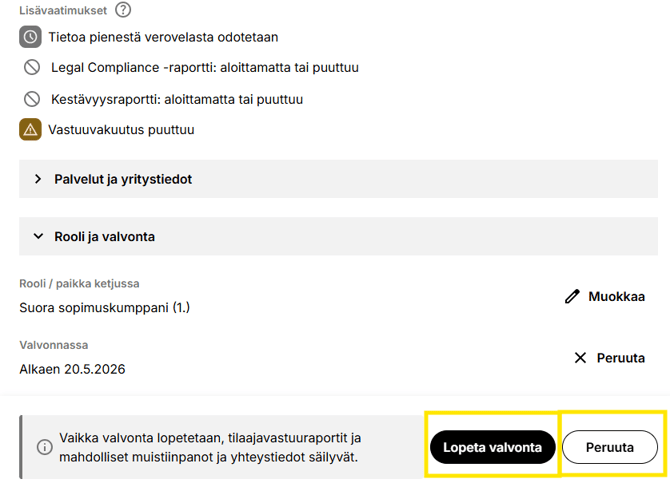
Report Archiving
If necessary, you can download and save the reports for your own records.
Currently, reports can be saved only manually, and bulk downloading is not available.
If the company is still under monitoring, first remove the company from the monitoring list according to the instructions in Removing a Company from a Monitoring List.
The company will then be moved to the Valvonta lopettu (Monitoring Ended list).
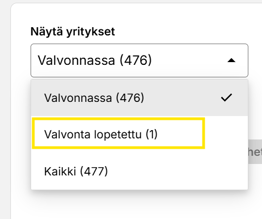
Open the list and open Yrityskortti (Company Card ) of the company whose reports you want to save.
-
Select Historia (History) tab.
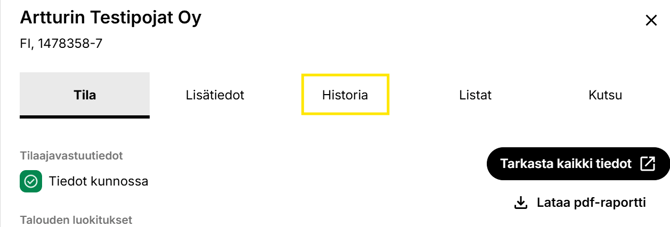
- Open the reports one by one using the Import icon.
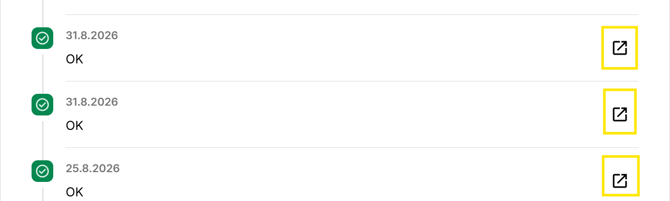
- Luotettava Kumppani (Reliable Partner) report opens in a separate window, from which you can save the report to your own system.
Using Näytä raportit kaikilta valvontalistoilta from all monitoring lists function on Historia (History) tab, you can display all reports for the selected company from all monitoring lists at once.
Notes Fields
You can add your own notes to a monitoring list and to the companies on the list using the notes field. Notes can be added to a monitoring list when creating the list. For an active monitoring list, the notes field can be found by selecting "Muokkaa valvontalistan tietoja" (Edit Monitoring List Details).
To add notes to an individual monitored company, first click the company name. In the view that opens, a text field for notes is available at the bottom of the page.
The notes fields are visible to all users within your company who use Valvoja. Therefore, only add information that can be shared with all Valvoja users. The fields can also be edited by all Valvoja users.
Ending Monitoring
Ending the monitoring of a monitored company
Click the company name from any list view.- Yrityskortti (Company Card ) opens.
- You can stop monitoring the company by clicking Lopeta valvonta (Stop Monitoring) button.
- The company will be moved to the Valvonta lopetettu (Monitoring Ended) status on the monitoring list. You can later find it on the same monitoring list using Valvonta lopetettu (Monitoring Ended) filter.
No further alerts are sent, but archived reports remain available.
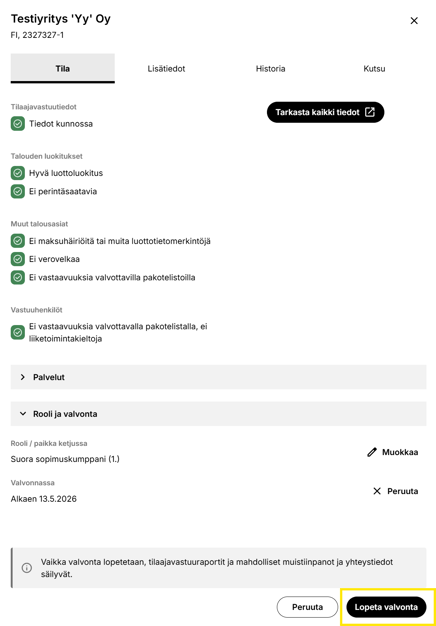
Picture: Company Card of a Monitored Company and Ending Monitoring
Remove a Company from a Monitoring List
A company can be removed only after monitoring has been ended.
-
Näytä yritykset (Show Companies) → Valvonta lopetettu (Monitoring Ended)
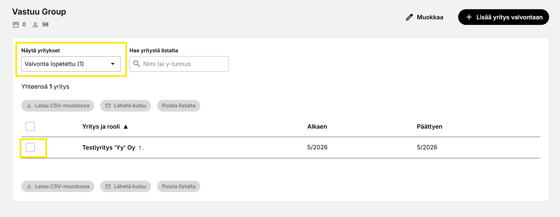
Picture: Removing a Company Completely
To remove a company from the list, click the name of the monitored company and select Poista yritys listalta (Remove Company from List).
If you want to complete the action, click Poista yritys ja raportit (Remove Company and Reports) in the pop-up window that appears.
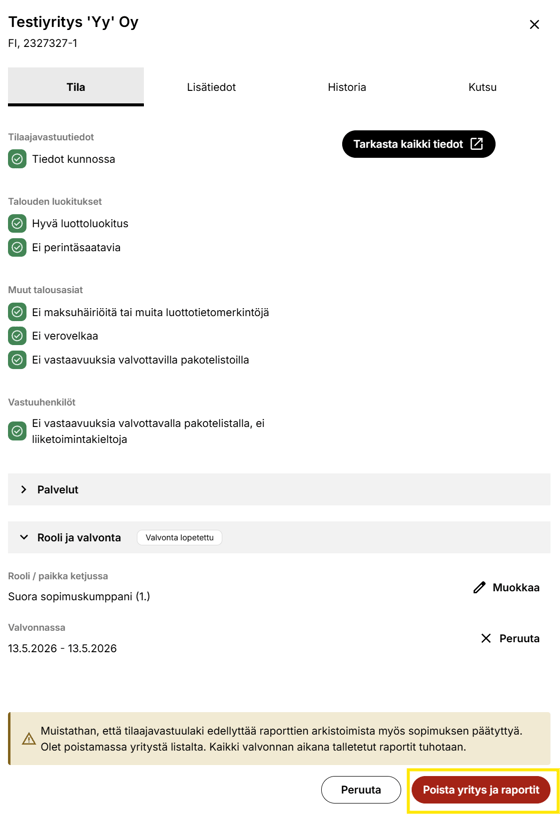
Picture: Removing a Company from the Monitoring List
When a company is removed, all reports stored during the monitoring period will be permanently deleted.
- If the company is part of a chain and has other partners linked beneath it, the data for those companies will also be deleted.
Closing a Monitoring List
A monitoring list does not expire automatically, and it is not possible to set an end date for it. The monitoring list must be archived separately.- Open the monitoring list.
- Click Muokkaa (Edit) monitoring list.
- Click Lopeta listan valvonta (Stop List Monitoring).
- Vahvista (Confirm).
- The archived monitoring list can later be found on Valvonta (Monitoring) tab under Näytä arkistoidut listat (Show Archived Lists).

Picture: Ending a Monitoring List, “Stop List Monitoring”
When you archive a list:
- The reports saved during the monitoring period will be retained.
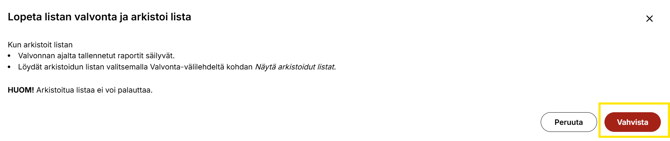
Picture: Ending Monitoring of a Monitoring List
You can find an archived list by selecting Näytä arkistoidut listat (Show Archived Lists) on the Valvonta (Monitoring) tab.
NOTE! An archived list cannot be restored.
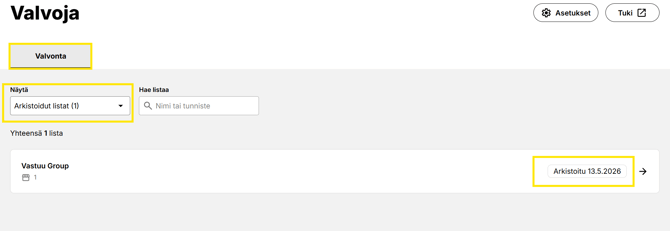
Picture: Archived Lists